
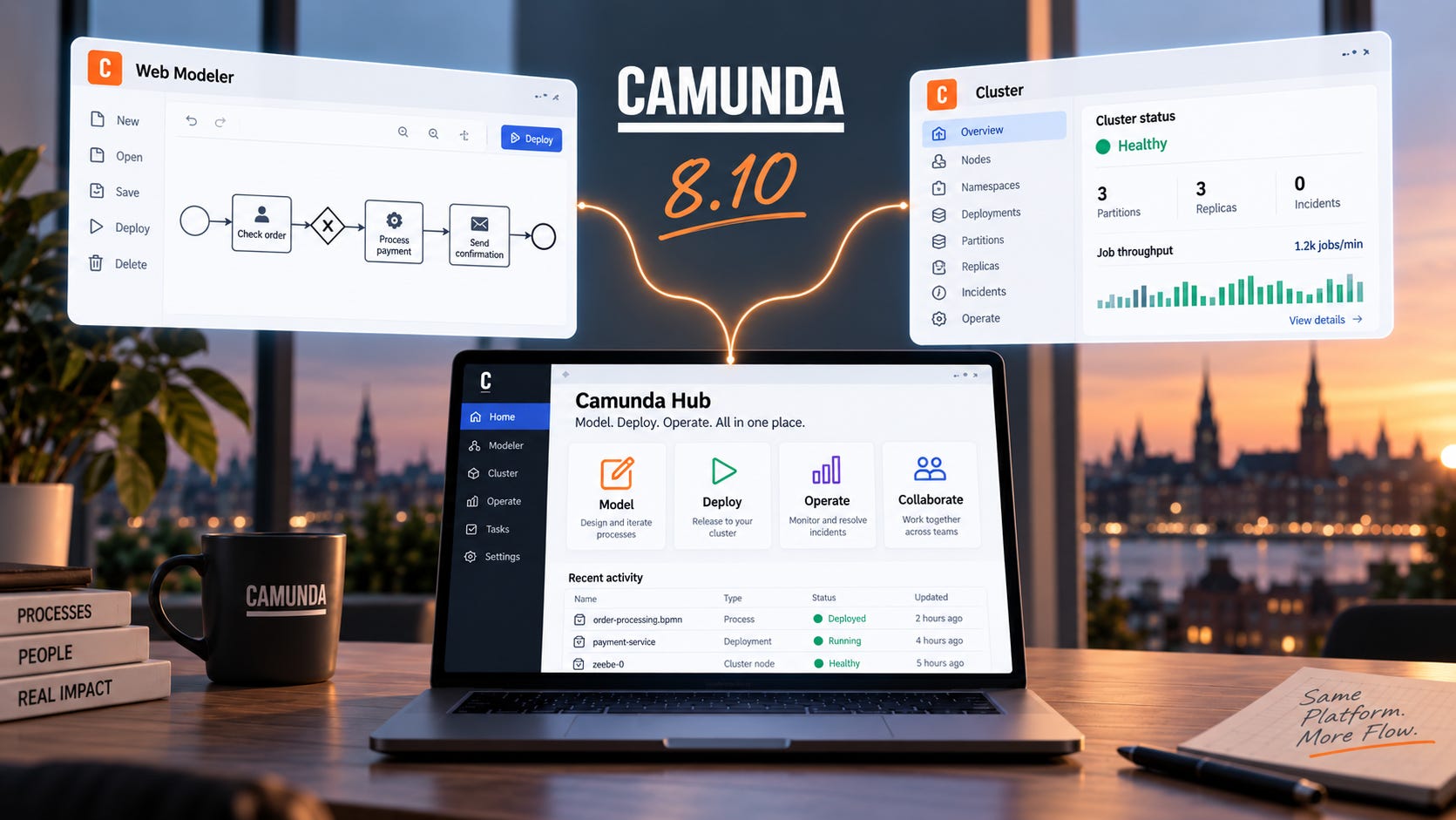
Camunda 8.10 ships on October 13, 2026. Camunda 8.7 reaches end of standard maintenance that same day, which leaves anyone still on 8.7 with no overlap between the release going out of support and the one replacing it. The release also removes everything 8.8 deprecated.
The headline features are Camunda Hub and an engine API for agents. For existing users, most of the actual work sits a bit deeper: removed APIs, changed defaults, Helm 4 for self-managed, and the Web Modeler migration. Camunda’s own what’s-new page starts with unified authentication, Optimize data filters, and that migration.
Camunda Hub Replaces Console And Web Modeler
Camunda merged the two products into one. Center of excellence teams manage infrastructure, access, and workspaces at Organization level; delivery teams model and deploy inside a Workspace. Almost every name changed.
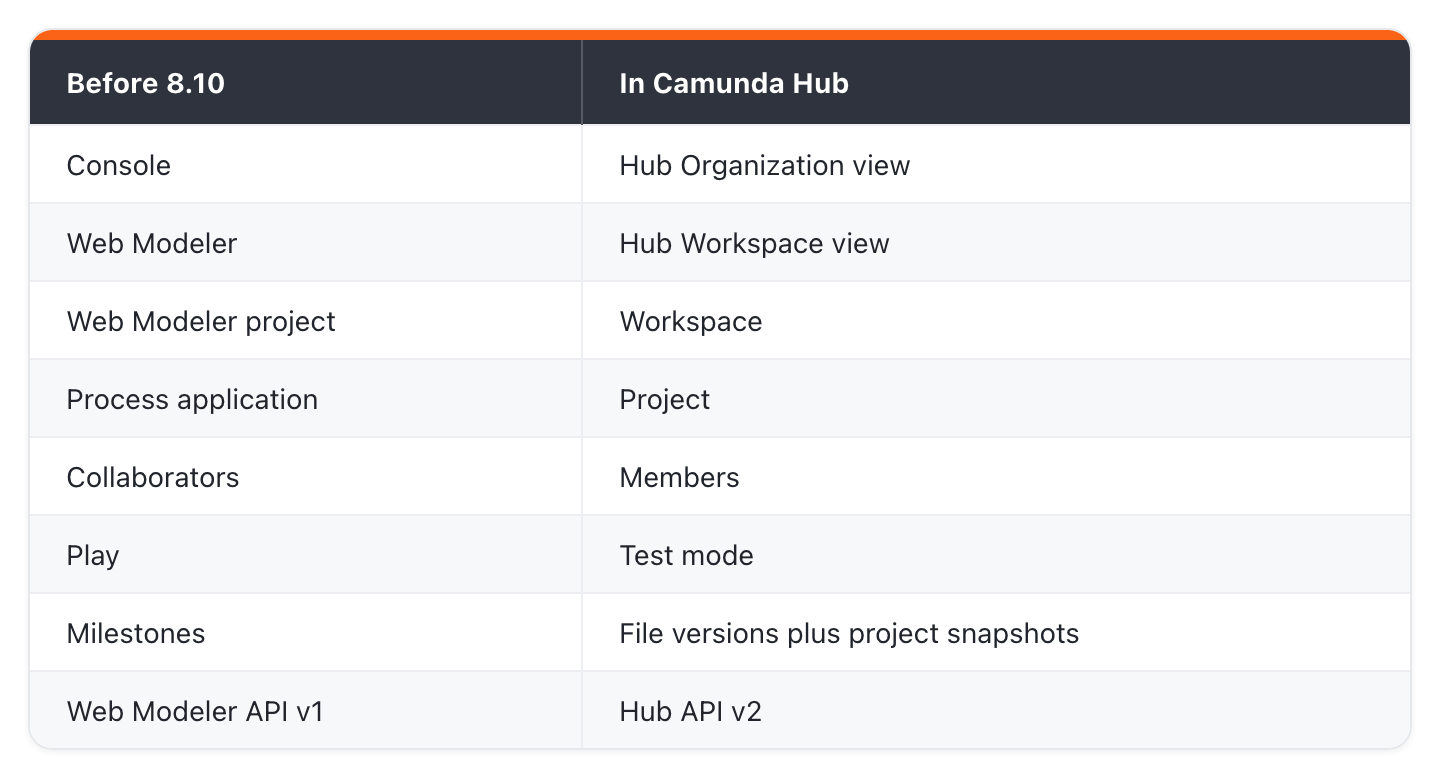
Workspaces have their own members, roles, projects, and clusters, and the Catalog holds element templates synced from one Git repository. Credentials live as organization-level cluster variables; connectors reference them as camunda.secrets.KEY.
At CamundaCon in May, I saw Camunda Hub show which workers and connectors belong to each cluster. It also flagged models using old connector template versions, and it kept tenants, secrets, and connections in one place. Today I open models one by one to find those templates, and I cannot see the worker-to-cluster connection at all. If the released Hub matches that demo, I stop doing both.
The Hub API v2 arrives with the release, and Web Modeler API v1 is deprecated in 8.10 and removed in 8.12 (Oct 2027), with the Console self-managed API on the same schedule, which leaves anything built against either of them two releases to move across before it stops working. Camunda migrated SaaS to the new workspace structure in August. Self-managed gets the same structure at GA.
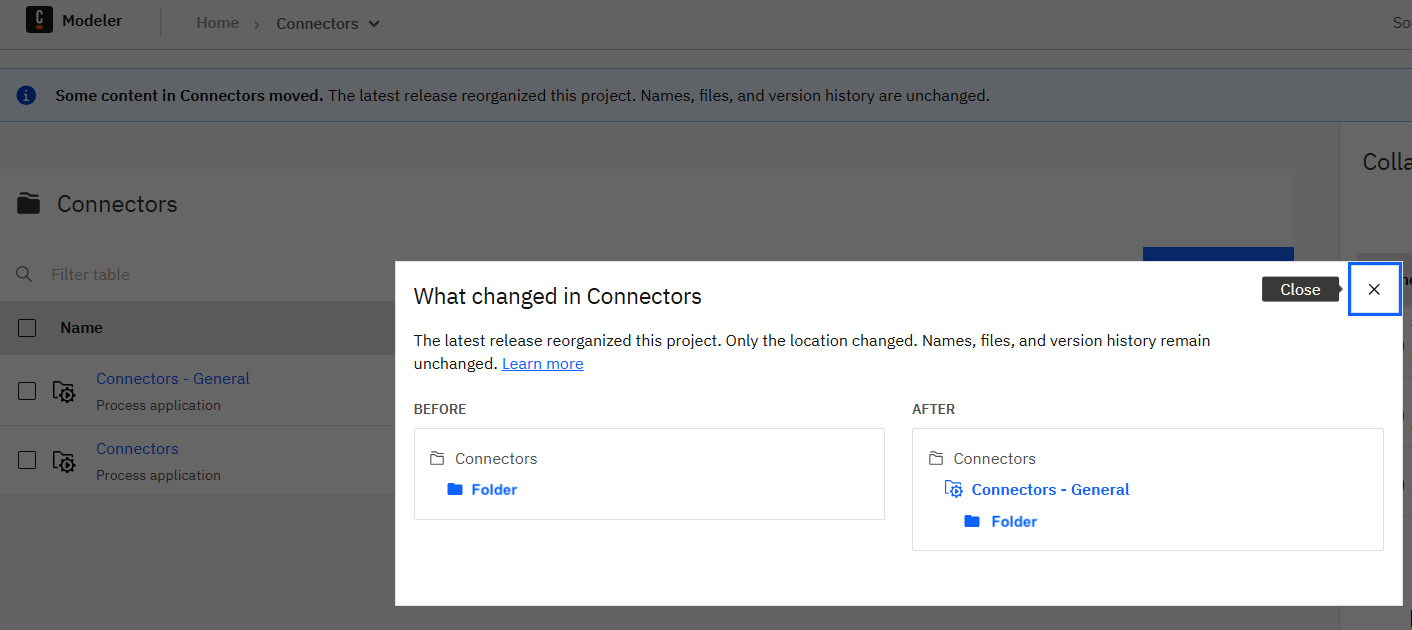
In our SaaS organization the migration arrived in the modeler. Folders came back as process applications, created by Camunda Migration, with an info panel saying only the location changed, not names, files or version history.
Self-managed users have to replace two chart settings:
# 8.9
console:
  enabled: true
webModeler:
  enabled: true

# 8.10
camundaHub:
  enabled: true
The images become camunda/hub and camunda/hub-websockets, and any leftover camunda.console.* configuration fails the application on startup. The chart change is the easy part: there is no rolling upgrade from Web Modeler to Hub, so every Web Modeler instance has to stop and its database has to be backed up before Hub starts, and because the database migration cannot be reversed, that backup is the only way back to 8.9. The component upgrade guide lists every removed setting. Management Identity is still separate and still required. Console Admin and Web Modeler Admin both gain access to Hub cluster pages, so check who holds those roles before the upgrade.
What The Engine Now Knows About Agents
The orchestration cluster models agents as first-class entities now. An agent definition comes from a zeebe:agentDefinition extension on the model, and an agent instance carries state, token usage, tool inventory, and conversation history grouped by loop iteration. Eight new endpoints cover definitions, instances, updates, and history search.
None of it shows up for an agent modeled before 8.10. Operate fills the panel once the element template moves to latest v1 or v2 and the model is redeployed; until then it stays empty.
Select the agent element in Operate and you get the instance key, model, system prompt, resolved tools, and usage against the configured token and call limits. The state moves through Initializing, Tool discovery, Thinking, Tool calling, Idle, and Completed. Below the diagram, the conversation history groups every prompt, message, tool call, input, and output by loop iteration, inside the same process instance, and shows the model’s reasoning inline as a Thinking entry where the provider returns it.
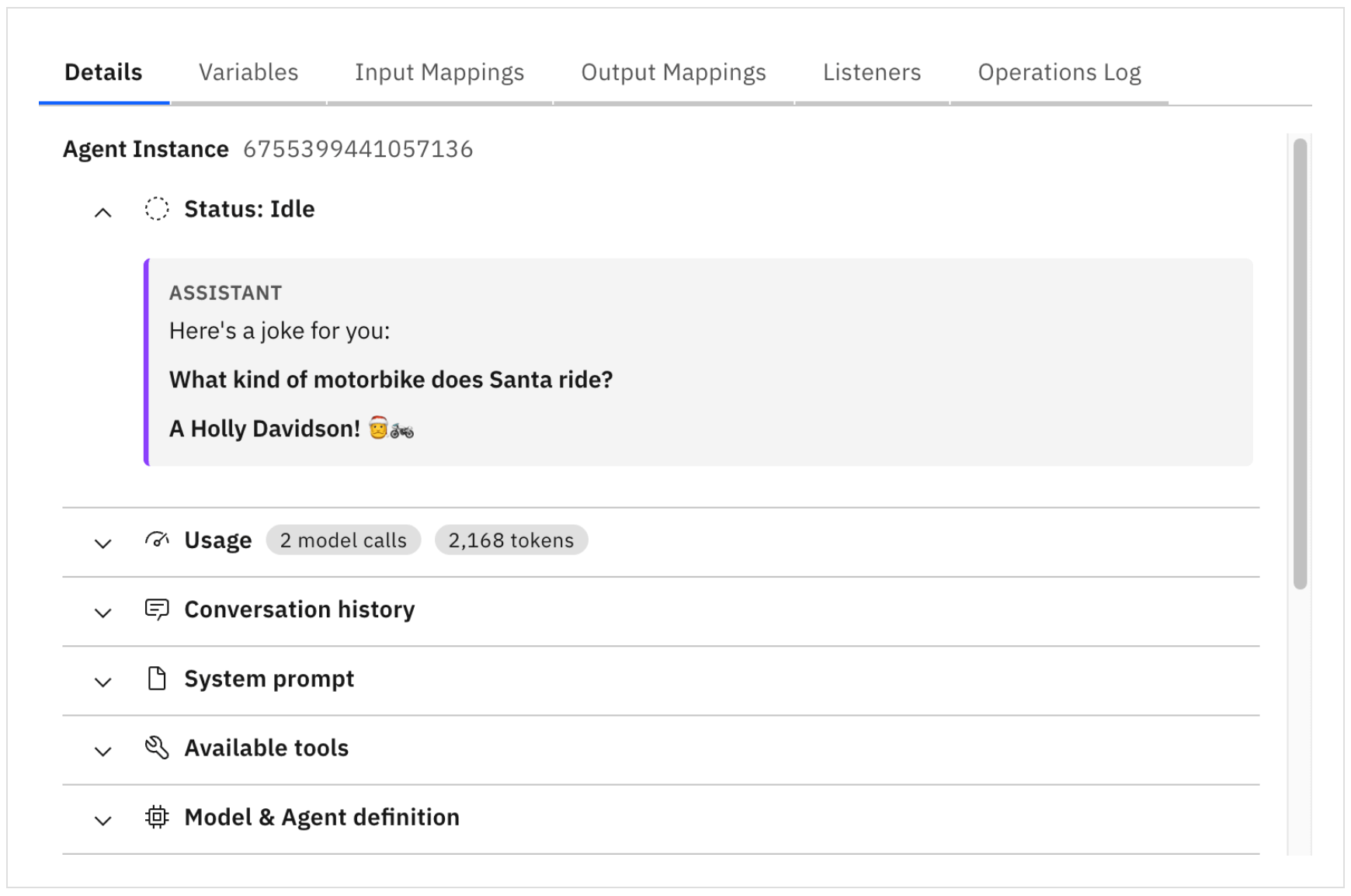
The 8.9 version of that documentation page had you switching on execution counts and hunting tool inputs in a parent scope. The 8.10 page says you rarely need raw process variables. Operate also renders a LangGraph or CrewAI runtime beside the process instance when it registers through the Agent Instance API.
The engine resolves the tools from the agent’s ad-hoc sub-process. That list is the BPMN boundary on what the agent can call, and the engine enforces it.
The Agentic Control Plane is an Optimize dashboard over completed Camunda AI agent instances. It is scoped per cluster, keeps 30 days of data, and does not manage or govern agents. The Camunda-provided LLM shipped in May and is documented identically for 8.8 and 8.9, so an 8.9 cluster already has it.
On May 20, after Camunda’s ProcessOS keynote at CamundaCon, I published Camunda Announces ProcessOS and said I would follow up when 8.10 shipped. Two weeks before GA, the docs cover the Control Plane dashboard, live agent state and conversation history in Operate, and processes as MCP tools. ProcessOS, Test Studio, and the Business Value Dashboard are not in them. ProcessOS itself is still in beta behind a waiting list, and Camunda gives priority to companies that bring a use case and a forward deployed engineer with it. Fingers crossed I get my hands on it soon.
EDIT: I wrote this against what was checked into the docs two weeks before GA, and Camunda of course works double shifts before a go-live. Two updates came in from Camunda after I published. ProcessOS, Test Studio, and the Business Value Dashboard will ship with 8.10 after all, and ProcessOS leaves the closed beta and becomes available to all paying customers; the release notes are being finalized now.
What Changed Outside The Agent Work
The orchestration cluster API gained 44 endpoints in 8.10 and removed none. Every active element instance can report what it is waiting for: a timer with its due date, a message with its name and correlation key, a signal, a conditional expression, a user task, or a job. Operate shows it under a Waiting label and details tab by default.
Business ID is now searchable across process instances, decision instances, user tasks, and message subscriptions. It also narrows message correlation as an extra filter, and FEEL reads it through camunda.processInstance.businessId.
Camunda added four endpoints for suspending and resuming process instances, plus a SUSPENDED state and a new permission, and Operate can suspend a single instance or a batch. Suspension halts the instance where it stands: no jobs activate or complete, no messages or signals correlate, and no timers fire. Variables stay readable and writable, so you can fix bad data before resuming. Timers that came due during the pause fire the moment the instance resumes, so a long suspension ends with every overdue timer firing at once.
Physical tenants sit between logical tenants and separate clusters as a third isolation option. Each tenant gets dedicated Raft groups, isolated secondary storage, and its own document store, while brokers and gateways stay shared, and in 8.10 the whole thing is self-managed only and configured statically with a rolling restart, with no runtime create, rename, or delete.
What Breaks In 8.10
Camunda removes everything it deprecated in 8.8, and the 8.10 migration guide maps each removal to its replacement. The Operate API, Tasklist API v1, Tasklist v1 mode, public start forms, and user task access restrictions are all gone. Java projects have to swap ZeebeClient for CamundaClient and Zeebe Process Test for CamundaProcessTest. Both show up as compile errors. The Camunda Spring Boot Starter also moves to Spring Boot 4.1.x, which pulls projects on 4.0.x into a migration of their own. Anything calling the Operate API or Tasklist v1 stops working until those integrations are rewritten. On self-managed, Optimize also rejects its static API token with a 401 straight after the upgrade, so any client that sends OPTIMIZE_API_ACCESS_TOKEN has to move to OIDC bearer tokens first.
Four behavior changes may not fail loudly:
Java client OAuth credentials are cached in memory by default, with the file cache now opt-in
JobIntent.COMPLETED no longer carries variables by default, which breaks custom exporters reading them
Message subscription search now returns start event subscriptions, with a new type field to filter them out
Resource APIs became eventually consistent
A custom exporter can keep running while it drops fields from a report.
Element templates can declare operations, so the modeling menu lists send email or upload object as searchable entries. Nineteen single-operation connectors were renamed, REST Outbound Connector to Send REST Request among them. Template IDs and runtime behavior did not change, so deployed models keep running and only the documentation and training material need updating. AWS connectors moved to AWS SDK for Java v2. STRICT became the default connector secret filter back in Connectors 8.9.10 and stays the default here, which the 8.10 announcement still lists as a breaking change.
Camunda 7 Gaps That Close
Several 8.10 items restore something Camunda 7 had and Camunda 8 did not. Camunda does not present them that way, and the release notes never mention Camunda 7.
Business ID is the big one. Camunda’s own data migrator maps the Camunda 7 businessKey onto it, and in 8.10 it stops being a label you carry around. Camunda 7 correlated messages by business key directly.
Execution listeners now take headers, which covers the field injection a Camunda 7 listener class relied on for its configuration, and a cancel listener runs when an instance is terminated, a hook Camunda 7 fired by default and Camunda 8 never had. Suspend and resume come back as API endpoints.
The SUSPEND authorizations have also been added, which closes the permission gap from the Camunda 7 section, and the docs follow shortly.
SaaS And Self-Managed Upgrade Notes
On SaaS
Optimize data filters are new in cluster settings, on by default for new clusters and opt-in for existing ones. Saving a filter restarts the cluster, and the records it filters out are gone for good.
Camunda’s official SaaS multi-tenancy support applies to generation 8.8 and later clusters. The same per-cluster toggle already appears in the 8.8 and 8.9 docs, and the 8.10 release note says no upgrade is required. Tenancy checks remain off by default, and turning them on locks out any principal without a tenant assignment.
On Self-Managed
Helm v4 is required and chart 15.x fails fast on Helm v3. Do the CLI switch while you are still on 8.9, because chart 14.x is the last one that accepts both. Nothing has to be migrated with it: Helm is client-side, both CLIs read the same release secrets, and there is no helm 3to4 step for Camunda charts. Server-side apply is on by default in Helm 4, which turns duplicate env entries into an install error. Bitnami subcharts are gone, another migration that belongs on 8.9. Minimum versions rise across ElasticSearch and OpenSearch (v2.19+), and PostgreSQL 14, SQL Server 2019, and H2 2.3 are dropped.
Four defaults then move underneath the install, and none of them stops the upgrade. RocksDB memory allocation stops being 512 MB per partition and becomes 10% of broker memory shared across all of them, which puts break-even at 5 GB per partition and most clusters below it. The smaller block cache sends reads that used to come from memory to disk, so throughput falls under load and the first sign of it is a latency graph. OpenSearch index replicas go from 0 to 1, which on a single OpenSearch node plan leaves a replica with nowhere to go, so cluster health sits yellow and the alert fires for a redundancy you are not getting, and on a real cluster it roughly doubles the disk every new index costs. The exporter switches to Optimize mode and drops every record value type Optimize does not consume, job records included: anything reading the Zeebe record indices directly quietly thins out. Optimize stops flattening object variables, so reports built on their properties come back empty, and the reimport that fixes them only works while the records are still inside the Zeebe retention window.
We made the Helm 4 switch on our own self-managed 8.9 platform on STACKIT in mid-September, a month before GA, and it was a non-event. Chart 14.x takes both CLIs, so it came down to a version pin in CI and a new test rule that refuses a Helm 3 binary. Test and prod rendered byte for byte identical across the Helm 4 patches we tried, every policy assertion passed, and nothing in the cluster moved. The reason to do it early is ArgoCD, which renders every Application with Helm 4 from 3.5 on: Helm 4 keeps explicit null fields that Helm 3 dropped, so a chart can render differently with no version change at all.
We turned that exporter filter on by hand in early August, on the same platform. Export was the binding constraint in our load tests then, and switching it on doubled export to 851.000 records/minute with the exporter thread still 40 percent idle, which moved the bottleneck off export and onto the engine’s accept ceiling. In 8.10 it arrives as a default, so the throughput comes for free, and so does the record loss that pays for it.
Summary
Still on 8.7: standard maintenance ends on October 13, the day 8.10 ships. Nothing else on this list matters until that hop is scheduled.
Custom integrations: inventory every Operate API, Tasklist API v1, ZeebeClient and ZeebeProcessTest dependency now. The library removals surface as compile errors, the API removals as failing calls.
Self-managed Kubernetes: switch to the Helm v4 CLI while chart 14.x still accepts both, then re-render your values against chart 15.x and check custom exporters for the changed completed-job records.
Agent models: move the element templates to latest v1 or v2 and redeploy, or the new Operate panel stays empty.
Everyone: the Hub names reach runbooks, training material and support conversations long before anyone touches a cluster.
The full detail is on Camunda's what's-new page for 8.10: https://docs.camunda.io/docs/next/reference/announcements-release-notes/8100/whats-new-in-810/.
That's a great summary of the release!