

I was going through the Camunda 8.8 release notes and stumbled over something that immediately reminded me of a very real production pattern: writing code that does nothing but reshape data so a connector can call an API. The thing that caught my eye was getJson(), an intrinsic function you can use inside connector inputs.
For a long time I tried to do everything with FEEL. And honestly, for regular variables FEEL is usually enough. You can shape payloads, pick fields, and build objects without writing code.
But the moment documents enter the picture, the game changes. A document process variable is a reference, not the content itself. That’s where intrinsic functions earn their keep: they help you turn document content into the string or object your connector input actually needs, without pushing that work into another worker or external transformer.
This article is about intrinsic functions in connector inputs, why they exist next to FEEL, and how to use the prebuilt ones in a way that keeps the model readable and avoids new glue services.
FEEL vs. Intrinsic Functions
FEEL stands for Friendly Enough Expression Language. In Camunda, FEEL is the expression language you use in conditions, mappings, and DMN, and it’s generally evaluated in the engine for workers. It is already very powerful for shaping data that lives in process variables.
If your inputs are normal variables (strings, numbers, lists, objects), FEEL is usually all you need. You can build the connector payload directly from them:
{
  "profile": {
    "username": request.body.user,
    "contact": request.body.mail
  }
}
Intrinsic functions exist for the cases where that’s not true, which in practice usually means documents. They are evaluated in the connector runtime. A document variable points to content stored in document storage. FEEL can pass that handle around, but it does not automatically read and parse the document content for you.
There is also a FEEL engine in the connector runtime, since e.g. Intrinsic Functions can use FEEL to locate content in JSON documents, and Inbound Connectors can also have FEEL expressions, which need to be evaluated first.
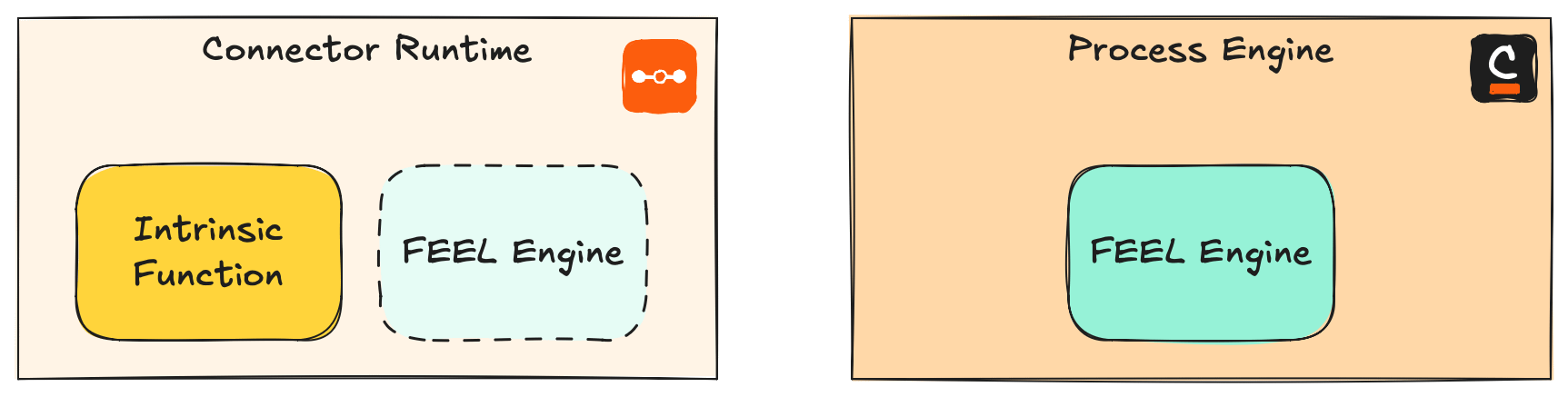
That’s the core distinction:
Use FEEL when you are shaping data that is already in variables.
Use intrinsic functions to turn document content into something the connector input can embed.
And just to repeat something: documents do not belong into the engine. Not as JSON blobs, not as base64, not as “just this one file”. Same for secrets. They usually don’t drive the process and if they end up in process state, they tend to end up in places you didn’t plan for, like logs, exports, and replication.
Camunda keeping intrinsic functions in the connector runtime is a smart design choice because the payload can be unpacked and parsed there without pushing the document content into engine state.
Intrinsic Functions: A Small Tool With Big Leverage
Intrinsic functions are small transformations applied to connector inputs right before the outbound call happens. A few constraints matter in real projects:
You describe them as a small JSON object inside an element template input field.
They run in the connector runtime, not in the process engine.
They only apply to outbound connectors, because they transform process data on the way out.
When Intrinsic Functions Actually Run
Intrinsic functions are not evaluated by the process engine like FEEL in a gateway or mapping. They are executed in the connector runtime when the connector input payload is handled. In simplified terms:
The engine sends the serialized input to the connector runtime.
The runtime deserializes it during variable binding, and if it finds camunda.function.type in it, it executes the function while deserializing.
The connector runs with the resulting, fully materialized input.
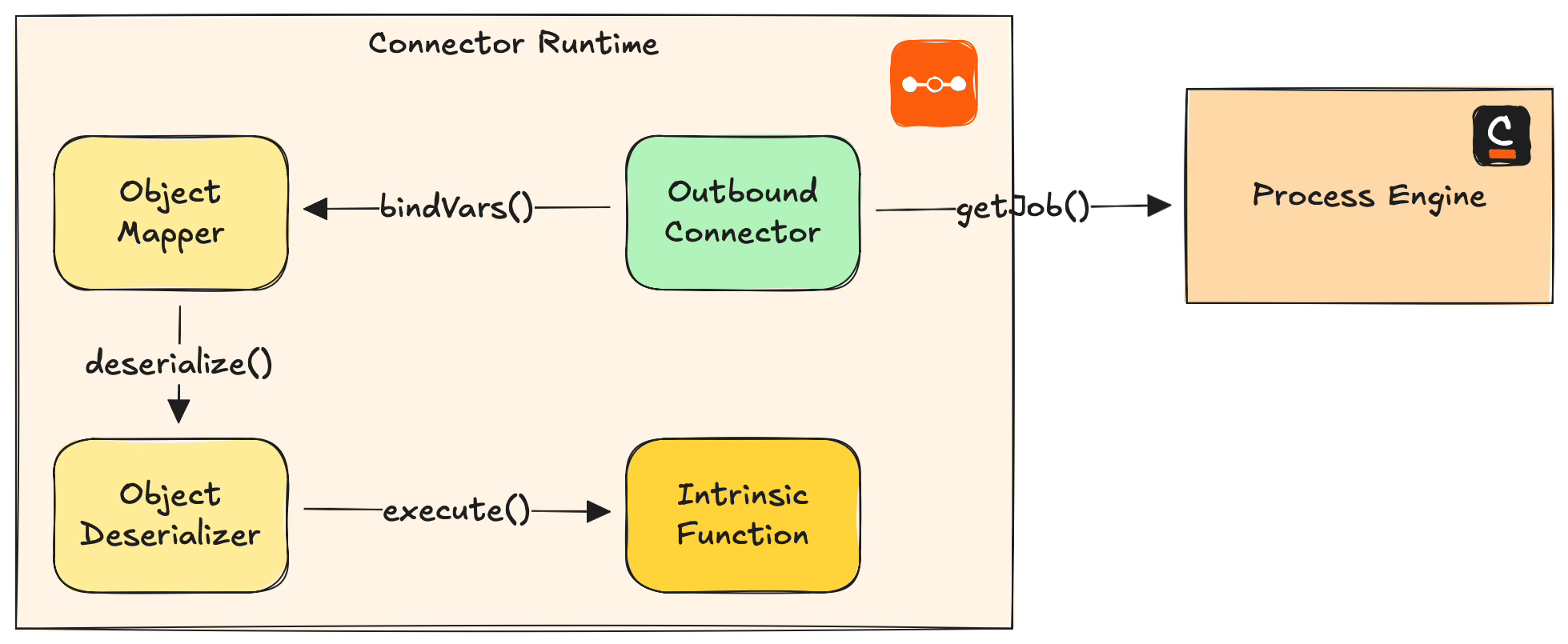
Technically, this is implemented with custom Jackson deserializers in the connector runtime that can deal with different target shapes, for example strings, objects, bytearrays, or documents.
Examples
The JSON shape is deliberately minimal. You set a connector input value to an object with a function type and parameters, for example:
{
  "camunda.function.type": "getText",
  "params": [orderSummaryDocument]
}
A common use case is document handling. You store inbound data as a Camunda document and an outbound connector expects a specific payload shape. With intrinsic functions, you can build that payload right inside the connector input mapping, without a worker that just unwraps and reshapes.
{
  "source": "checkout",
  "event": {
    "camunda.function.type": "getJson",
    "params": [paymentEventDocument]
  }
}
That’s the core idea: keep small, mechanical transformations close to the connector input contract, and don’t create a worker just to turn “document” into “something the connector accepts”.
Out of the Box Functions
The prebuilt intrinsic functions cover the most common glue operations you run into once documents are involved, plus a couple of small helpers that are useful even for plain variables.
Extraction From Documents
Document to String
getText takes a document reference (and optionally an encoding) and gives you the document content as a plain string.
Example: fill an HTTP request body field from a document, explicitly setting the encoding:
{
  "message": {
    "camunda.function.type": "getText",
    "params": [approvalNoteDocument, "UTF-8"]
  }
}
If you need a structured object instead of a string, prefer getJson.
Document to Object
getJson takes a document and optionally a FEEL expression parameter. It reads the JSON content from that document and gives you a FEEL object you can embed into the connector input.
Example: parse a JSON document and select a sub-field using the optional FEEL expression parameter:
{
  "camunda.function.type": "getJson",
  "params": [paymentEventDocument, "customer.email"]
}
Treat the optional FEEL expression like production code: keep it small and test it with realistic data.
Encode And Share Documents
Encode Document or String
base64 accepts a document or a string. It encodes the document content or string to Base64 format.
This is useful when you call APIs that expect base64 content (common for binary attachments), but you store the data as a document, or you build the data as a string in your process.
Example: base64 encode a document before sending it:
{
  "attachment": {
    "filename": "invoice.pdf",
    "contentBase64": {
      "camunda.function.type": "base64",
      "params": [invoicePdfDocument]
    }
  }
}
It can also encode plain string variables, for example a token or a small payload fragment.
Temporary pre-signed Link
createLink expects a document and can take an optional TTL (time-to-live). It returns a short-lived URL that lets another system fetch that document.
The simplest example is when the next system cannot consume a document reference, but it can consume a URL. Or when you need to pass a link to a human (email, chat, ticket), and the document should not be long-lived.
Example: create a link with a short TTL (15 minutes) for a manual review step:
{
  "camunda.function.type": "createLink",
  "params": [contractPdfDocument, "PT15M"]
}
Operational thought: treat the generated link as sensitive data. It is a capability.
Custom Intrinsic Functions
In self-managed connector runtimes you can also create custom intrinsic functions by implementing the IntrinsicFunctionProvider interface from the Connector SDK and adding it in your connector runtime’s classpath. It will be picked up automatically via SPI.
That can be a very pragmatic escape hatch if you have one recurring transformation that keeps showing up across models, templates, and custom connectors. For example, you might want to extract text fields from an XML and use them as input for another API.
A custom function that extracts a value from an XML document using an XPath-like path (simplified) could look like this:
public class FromXmlFunction implements IntrinsicFunctionProvider {

  @IntrinsicFunction(name = "fromXml")
  public String fromXml(Document xmlDocument, String xmlPath) {
    return xmlTransformer.getValue(xmlDocument, xmlPath);
  }
}
Calling fromXml from a connector input to extract a value from an XML document looks like this:
{
  "customerId": {
    "camunda.function.type": "fromXml",
    "params": [invoiceXmlDocument, "/Invoice/Customer/Id/text()"]
  }
}
Here, invoiceXmlDocument is a document variable and xmlPath is the path used to select the value.
The catch (of course there is one) is ownership and portability: a custom intrinsic function only exists in the connector runtime where you installed it. That means:
Only outbound connectors executed by that runtime can use it.
Different runtimes (dev vs prod, or different teams) can drift if you don’t ship and version the provider like real code.
You are trading “one less worker” for “one more runtime extension” that needs rollout and operations.
If you go down this road, keep the surface small and boring. The best custom intrinsic functions are the ones that are clearly mechanical, deterministic, and easy to test.
Summary
Intrinsic functions are one of those small features that remove a lot of integration friction. They don’t replace FEEL, and they don’t try to turn BPMN into a programming language. They just give you a safe place to unpack and transform document content, right where it belongs: at the connector runtime edge, not inside engine state.
Key takeaways:
Use FEEL when the data you need is already in process variables and you just want to shape a payload (objects, strings, lists, simple field picking).
Use intrinsic functions when a connector input needs actual document content (getText, getJson) or a connector-runtime helper like base64 or createLink.
Camunda stays true to their developer community: Build your own functions if necessary.
Edit: I added a clarification where Intrinsic Functions and FEEL Engine live, and that the runtime also has a FEEL Engine embedded, but for other reasons.