

Last time, I introduced you to the concept of compensation and how to rewind certain activities in a process.
Today, we take a look at improving our manual review process. Currently, the supervisor checks the workload of the employee manually, and decides if the employee can go on vacation, based on the number of their open tasks.
This works fine, but honestly, we want our supervisor to work on more important tasks, like improving employee satisfaction or improve productivity instead of manually checking on their peers.
Let’s take a look at a concept called Decision Tables.
Work Smart, Not Hard!
Here are the requirements for our new process:
Supervisors don’t have time to check each workload individually. There is a service endpoint, that returns the number of open tasks of an employee.
We can use static rules to decide if a request must be rejected:
Requests,
for > 20 days are rejected.
with no open tasks are approved.
with 1-5 tasks are approved, if requested days are less or equal 10.
with 1-10 tasks are approved, if requested days are less or equal 5.
everything else is rejected.
The model below shows, how the model could look like. As usual, new elements are marked green.
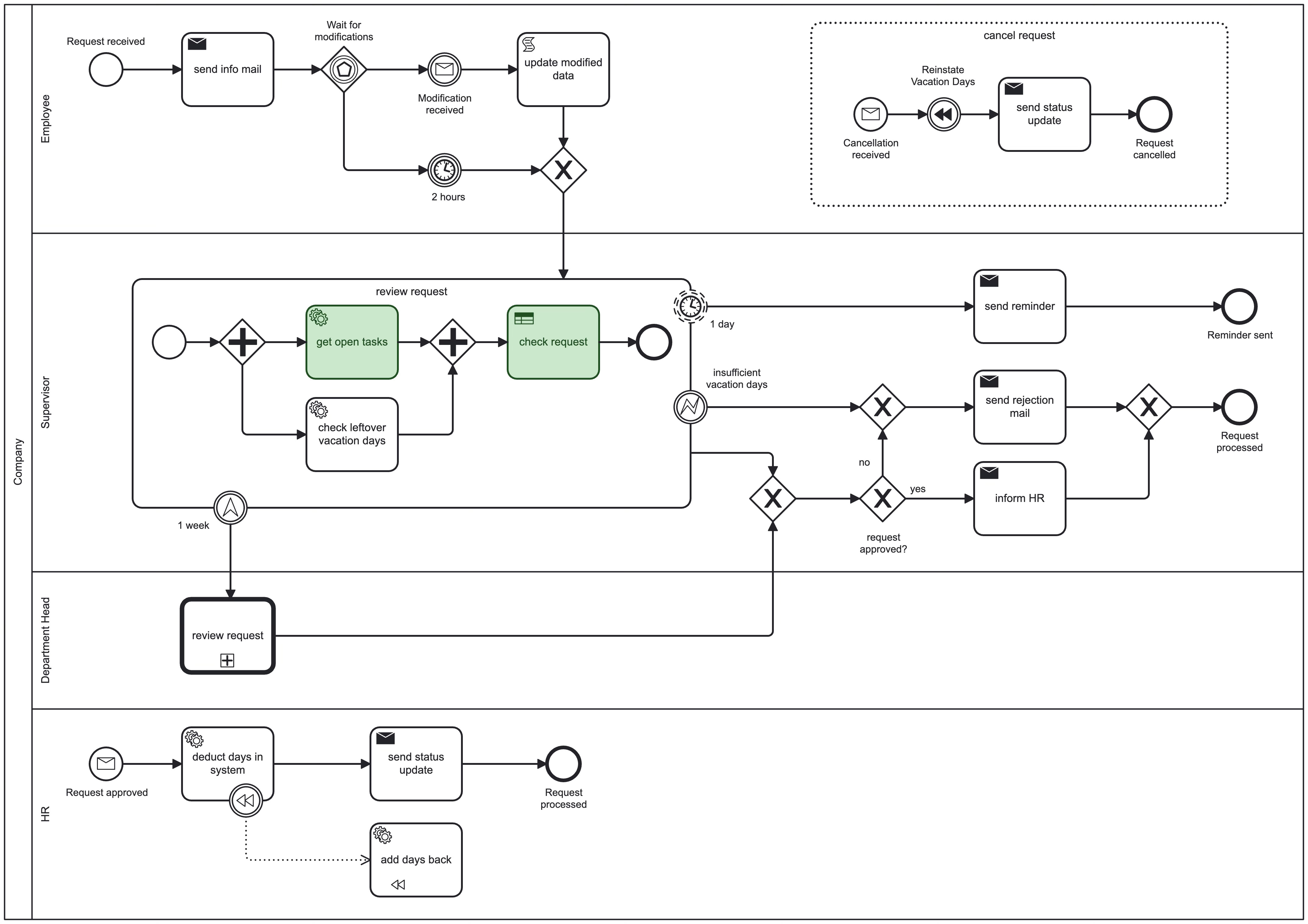
The Decision Table behind the new Business Rule Task is shown below.
The BPMN Building Blocks
Business Rule Task: “Check Workload”

Business Rule Tasks are a way to automate more complex decision logic.
They use a Decision Table modeled with DMN (Decision Model and Notation) which is another standard in the world of business process management.
The task has static rules (e.g. when # of requested days > 10) and applies them to the provided inputs (open tasks and requested days). It generates an output (approval=false) based on the rules that apply for the input.
Decision Tables
Here is the Decision Table, I created for the provided vacation rules:
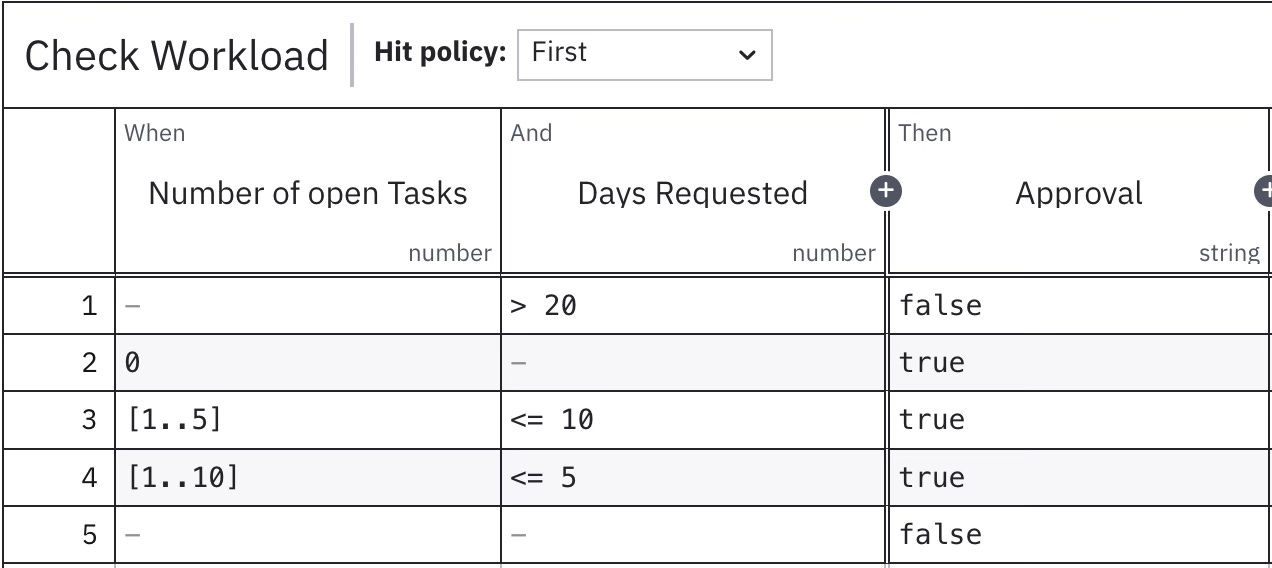
A Decision Tables is used to generate an output (a decision) based on inputs and a set of static business rules. The rows are evaluated one by one, starting with the first.
It has the advantage of a readable format, that can be easily created e.g. by analysts who work with spreadsheets.
Each row contains a set of inputs, rules and outputs. If the rules match, the row has a match or a hit.
The rules in each table can be overlapping, leading to multiple hits. Therefore a Hit Policy is used to decide how to collect the matching outputs. In our example, the first hit will be returned.
What’s Next?
Decisions just got way smarter:
Decision Tables allow us to formulate complex rules in a readable form, instead of using multiple XOR gateways.
Companies use tables spanning from many hundreds rows to over a hundred thousand decision rows.
They’re modeled using the DMN standard. It offers even more sophisticated ways, to model decision. But this is content for another post.
In the next post, I want to dig a bit deeper into compensation, and show you how to achieve some kind of transactional behavior, by grouping a set of activities together. The special thing about this is, that they either all succeed as a group or completely fail together.