

Last time, we added some escalation events to our model, to keep the process afloat. In this article I want to dive into keeping models simple and the reusability of components, by using sub-processes of different kinds.
Imagine, the review task for supervisors and the department heads, get more complicated. We would need to model the logic twice: once for the supervisor and once for the department head. That would be unnecessary. BPMN offers a construct called a sub-process, to address this. Let’s take a look.
Note: Keep It Simple, Stupid! The idea of K.I.S.S. is that solutions work best and are easier to understand, maintain, and improve when they are kept as simple as possible.1
Reuse Process Logic With a Sub-Process
Here are the requirements for our new process:
Before an employee can go on vacation, the leftover vacation days have to be checked.
Additionally, the supervisor or department head has to check the current work balance. The company hates, if work isn’t finished before vacation.
The model below shows, how the model could look like. As usual, new elements are marked green.
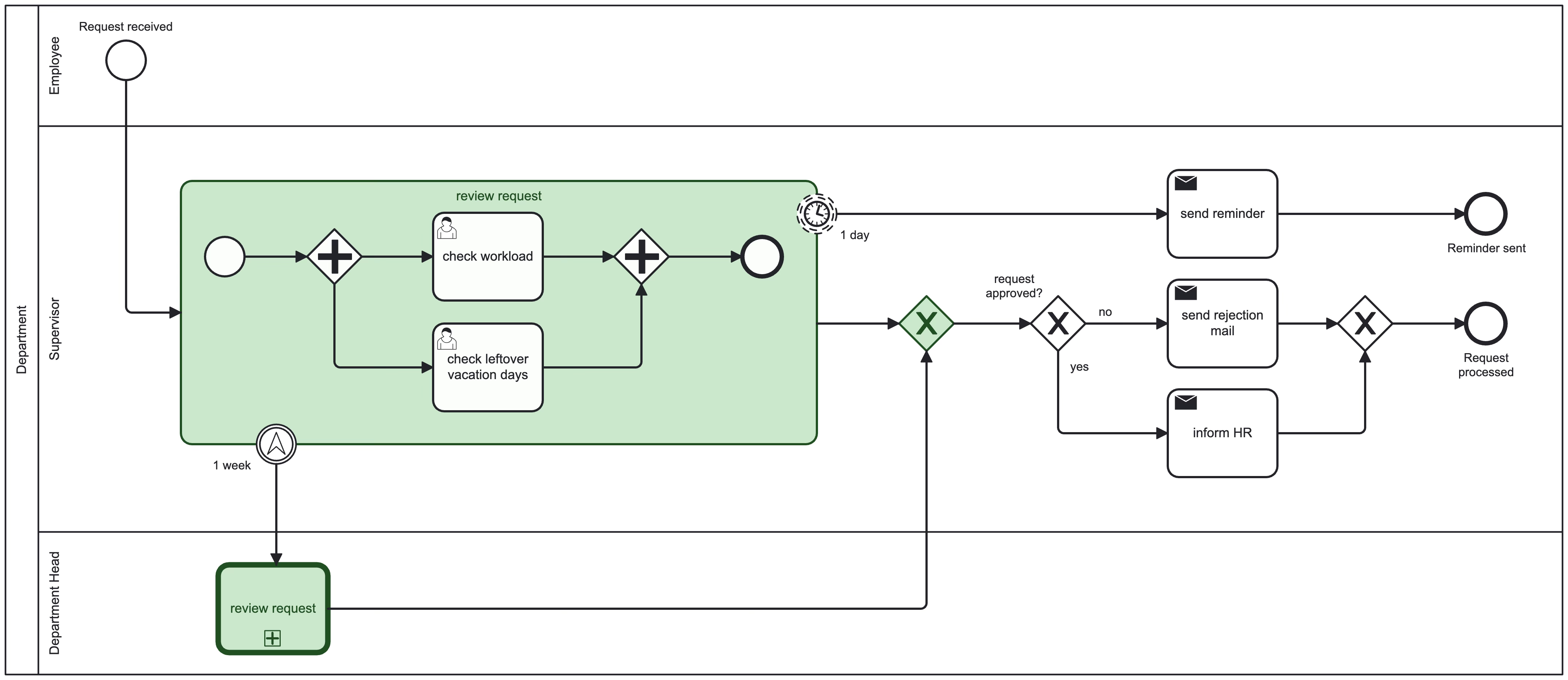
Since the review logic is now slightly more complex, we don’t want to duplicate it, since changes need to happen in both paths. I used two different methods to encapsulate a process: a simple Sub-Process on top where a regular process is modeled and a Call Activity below, which is just a reference to an external process definition. Both encapsulate a process.
Note: The Sub-Process is only used as visual aid. It doesn’t help to reduce duplication. For that use case, both review tasks need to be Call Activities.
The BPMN Building Blocks
Parallel Gateway: Multitasking

Parallel Gateways are a diamond shape with a plus sign in it. They are used to split a single flow into multiple outgoing flows, without any condition. All outgoing path will be taken.
When merging different paths with a Parallel Gateway, it waits until all incoming flows reach it, basically synchronizing the process back into a single outgoing flow.
The Parallel Gateway is also called AND Gateway, because of its semantics of following or waiting for all (the first AND the second AND the third etc.) outgoing or incoming paths.
Sub-Process: “Review Request”

Sub-Processes are part of a bigger model and visually separate different logic. It is a simple box with a solid border. If it is collapsed for readability, there is a small plus (+) sign at the bottom.
It can be used to simplify a model, but doesn’t help when it comes to duplication. A Sub-Process cannot be referenced.
Call Activity: “Review Request”

Call Activities on the other hand are a reference to an external process model. They have a bold solid border with a plus sign (+) on the bottom. There is no expanded visualization for Call Activities.
When a Call Activity is reached, a new instance of the external process is started.
This way, we can reuse a process model in different other processes, without the need to copy it.
What’s Next?
Now we know how to keep our process model clean:
Sub-Processes can be used to encapsulate a process. They can be collapsed into a Task to keep the model simple.
Call Activities are a way to reuse a process in different models.
Both support Boundary Events, to react to events.
Errors can happen everywhere and also BPMN offers mechanisms to handle them. A stopped process is even worse than a waiting process. Someone has to fix the issue manually. In the next post we will learn about errors and how they can be used to keep a process running, even though errors happen.
For more information, see: https://en.wikipedia.org/wiki/KISS_principle
The task for various roles with various actions, we use better the event sub process.