

Last time, we learned how we can react to errors of automated tasks. I introduced different Error Events to you and introduced you to the concept of a Service Task, which is executed by a system, without human interaction.
Today, I want to improve the customer experience of our process. Imagine you just handed in your next vacation request. You hit the Send button and realize, that you requested too few days. That trip to Canada takes 14 days, not just four.
In the current process, you’d need to call HR, or your supervisor, and ask for a rejection, so you can send another request. That is possible, but not very smart. Let’s see, if there are better ways to do that.
Give Employees Some Flexibility
Here are the requirements for our new process:
Employees receive an informal mail about their vacation request. The e-mail contains a link to a form, to modify the request.
They can update their vacation request for the next two hours after submitting them. The request will be processed afterwards.
The model below shows, how the model could look like. As usual, new elements are marked green.
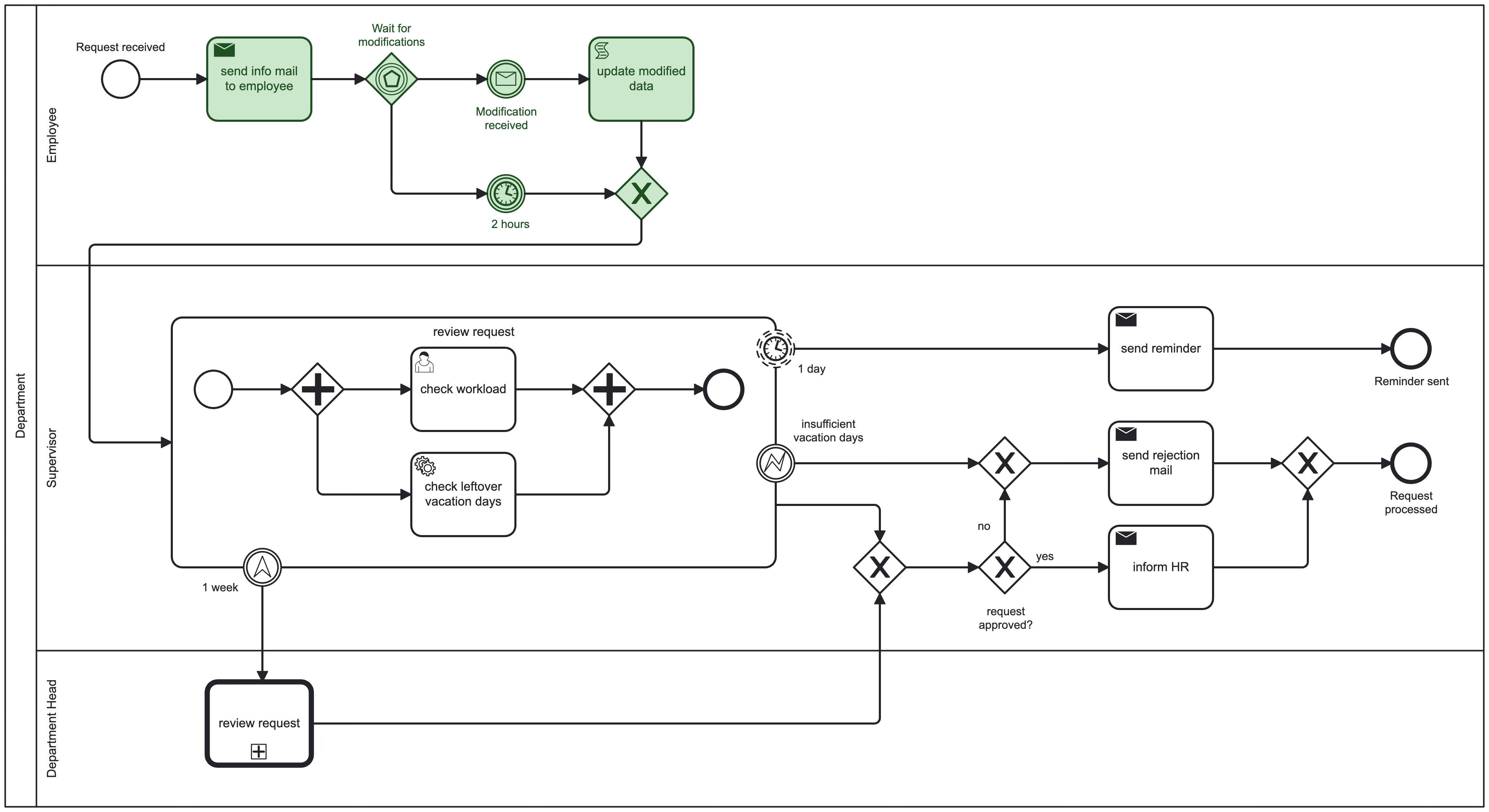
There’s a fancy new Gateway and it has something to do with our two hour window to change the request. Do you have an idea what it exactly does?
The BPMN Building Blocks
Timer Intermediate Catch Event: “Time Is Ticking”

A Timer Intermediate Event is used to halt the process for a certain amount of time.
Timers are always Catch Events, since they measure time and catch the event when time’s up or a certain date is reached.
Message Intermediate Catch Event: “You’ve Got Mail“

A Message Intermediate Catch Event is used to halt the process to wait for a certain type of message. As you already learned, it is catching therefore the symbol is empty with black border.
The difference to the Timer Event is, that a message is not guaranteed to arrive. A timer will come to an end sooner or later. In our case, the employee sends a correction of the request, or not.
Event-based Gateway: “Let’s Go Where The Action Is“
Some of you might relate to that: It’s Friday and you have several invitations to parties. But which one should you pick? Event-based Gateways face a similar issue, but they come with an easy solution: First come, first serve.

Event-based Gateways are a way to steer your process flow to where the action is. It will not evaluate conditions, but takes the outgoing path, where the earliest events happens.

To achieve this, only catching events are allowed after the Gateway. This includes Intermediate Timer Catch Events, Intermediate Message Catch Events (or a Receive Task), Intermediate Conditional Catch Events or Intermediate Signal Catch Events.
Conditional Events (with the small document) happen if a certain condition evaluates to true. Signal Events (with the small triangle) are similar to Message Events. The difference is, that a Signal Event is a broadcast to all processes listening to it. Message Events are meant for one recipient only.
Note, that Error Catch Events are NOT allowed. They are Boundary Events only.
What’s Next?
The employee is happy. They were able to correct their request and get their approval just in time.
We use an Event-based Gateway to wait for certain events, and continue where the first event occurs.
We added a Timer Event, to ensure that the process continues after a certain time.
Not every Catch Event is automatically an Intermediate Catch Event. Errors (and some other symbols) can only be used as a Boundary Event.
If you think about it, it makes sense. Errors happen in a certain context, e.g. during a certain Task or Sub-Process. We want to handle them right there, in this context. The process flow must not wait for an error to continue.
In the next post we want improve the user experience a bit further, by allowing employees to cancel requests and ensuring, that booked vacation days are added back with a mechanism called compensation.