
Last time, I introduced a way to react to external events in your process with an Event-based Gateway. The process flow waits at the gateway, until an event happens, and takes the outgoing flow where the event occurs. This could be an intermediate message, a timer or any another incoming event.
Today, I want to show you, how a process can be rolled back, in case of an event or an error. BPMN has a concept called compensation, which makes it possible, to roll back already executed activities.
Your Flight Has Been Cancelled
Here are the requirements for our new process:
Employees are able to cancel their request, no matter how far the process is.
It has to be ensured, that–in case of a cancellation–the amount of vacation days is unchanged.
The model below shows, how the model could look like. As usual, new elements are marked green.
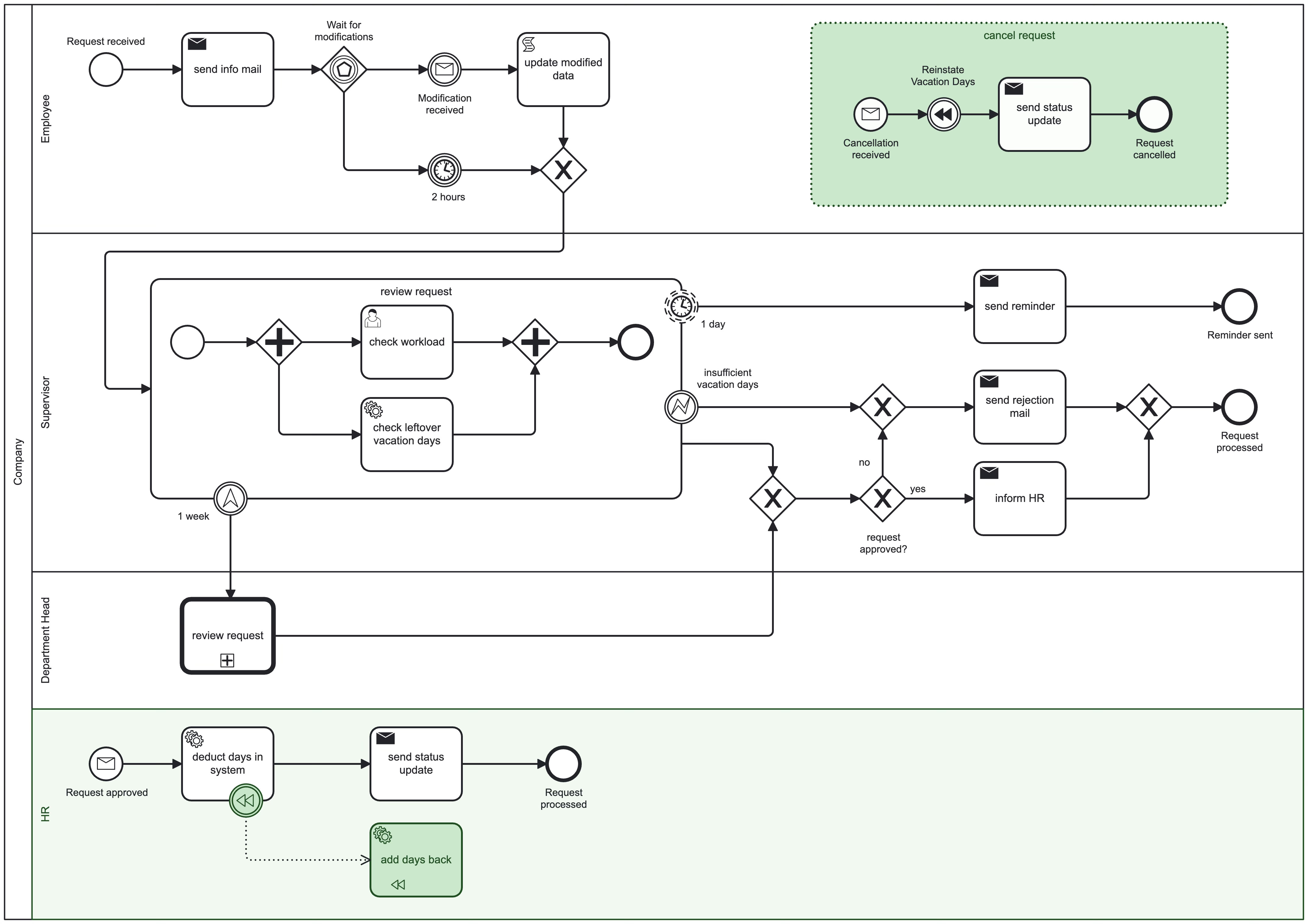
To keep the Compensation scenario simple, I moved the HR participant back into the original pool. Compensations over multiple pools are a bit more complex, since only Message and Signal Events can be sent between different pools.
The BPMN Building Blocks
Event Sub-Process: “Cancel Request”

Event Sub-Processes have a dotted outline, and can be modeled in any process or sub-process. They have a single Start Event which can both be interrupting or non-interrupting. It has to be an event though.
They’re used to listen to (mostly external) events, that can happen at any time during process execution, but which are important for our process. In our case, e.g. we could receive a cancellation at any given time in the process. Note that I used an Interrupting Message Event as start. That means, that the parent process is interrupted in its execution, when a cancellation comes in.
An Event Sub-Process can be activated multiple times (if non-interrupting) as long as the parent process is active.
You cannot add Boundary Events to it, since the Event Sub-Process itself, acts like a Boundary Event to the process it is placed in. The difference is, while a Boundary Event leaves the scope it is attached to in case of an event, the Event Sub-Process stays inside the scope where the event happens.
Compensation Throw Event: “Reinstate Vacation Days”

An Intermediate Compensation Throw Event is used, to trigger compensation in the current process. Since it is an Intermediate Event, it has a double, solid border and since it is Throwing, the rewind symbol (you might know this from your cassette player or VCR) is solid black.
Compensation is not done automatically. Your process needs to have counter activities for all tasks that you want to “rewind”.
Compensation can only happen inside of a pool. This is a main difference to messages or signals, which can have one or multiple recipients in other pools as well.
Compensation Boundary Event

A Compensation Boundary Event is one way to catch a compensation and execute a counter measure for the task it is attached to. You can also use a Compensation Start Event in an Event Sub-Process to catch a compensation event.
Compensation is only triggered, if its activity has successfully completed. Otherwise it will be ignored.
Compensation Task Marker

The compensation action is e.g. a Service Task. It has a little rewind symbol in the bottom left corner and must implement the logic to rewind the previous task.
It is connected to the Compensation Boundary event via an Association. That is a dotted line with an arrow on the target side. It’s not a regular process flow, but associates the compensation action with the original task. That also means, that the compensation Task has no outgoing flows.
What’s Next?
We now are able to clean up our system in case of errors or any other event:
We can listen to outside events with Event Sub-Processes, which can either interrupt the parent process, or keep it running.
Compensation Events can roll back any changes that we made in other systems.
In the next post, we want to automate the review process a bit more. I will show you, how more complex decisions can be modeled, without making the model complex.
The team found this article interesting on several fronts: 1) simple implementation of a Compensation Event, and 2) valid use case for an Event Sub-Process. Nice work Stefan.